
A Beginner’s Guide to Primavera P6
Learning Oracle Primavera P6 can be a daunting task. While P6 is widely accepted as the gold standard for CPM scheduling, it also has a reputation as being complex and tricky to use and learn. And on top of that, you may be unfamiliar with general scheduling practices and theories, making this process even more intimidating.
If you’re brand new to P6 and maybe brand new to scheduling and project management as well, here’s my Beginner’s Guide to Learning P6:
1. Understand Project Organization
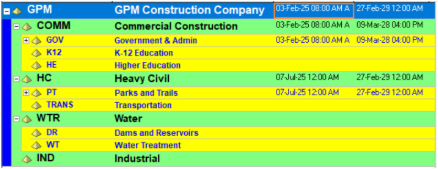
Primavera P6 is an enterprise project management application enabling multi-project and multi-user project management solutions. The first thing to familiarize yourself with is how projects are organized using the Enterprise Project Structure (EPS). I like to think of the EPS as the master filing cabinet of projects – it organizes the projects, facilitates reporting, and user access to projects. As a general end-user though, what you mostly need to know is where to put your new project in the EPS.
2. Understand Projects
Creating a project in P6 is your next step, but projects are just “shells” until you add information to them. The general hierarchy of a project goes like this:
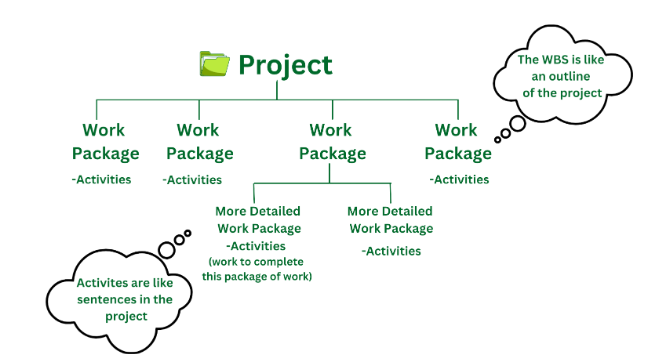
Projects contain work packages, called the Work Breakdown Structure (WBS). The WBS is an outline of the project’s scope of work. The WBS contains activities which break down the work that needs to be completed to deliver the work package it belongs to. Activities are the meat of the schedule – that is where durations, resources, and cost are estimated.
3. Understand Dependencies and Sequencing Project Work
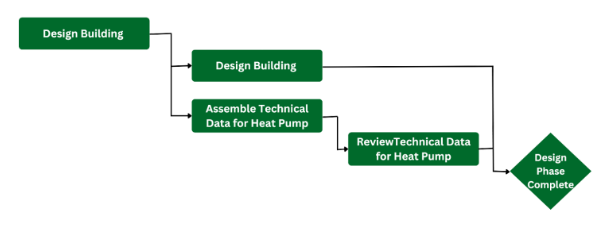
- Once the activity list is created, work is sequenced to tell the application the order the work should be performed and the dependencies activities have on each other. Combined with the duration of work, these dependencies determine start and finish dates for each activity and the overall project.
4. Don’t just practice creating the schedule, practice updating work
The project schedule is a living artifact; it should be updated to reflect what actually happens so work can be reforecast accordingly. So, don’t just practice creating the project schedule, you’re likely to spend a lot more of your time updating and reforecasting work than creating the initial project schedule. When you create a practice or case study project, mimic a few weekly or monthly updates by recording actuals and scheduling with a new data date. Review the schedule log and review the updated schedule. Imagine how changes or delays would be handled and practice that, too!
5. Dedicate time to create layouts
P6 can be an overwhelming application, one action may require several clicks within the application and to see the impact, you may find yourself adding several columns or customizing the Gantt Chart so you can see what has changed in the schedule. Layouts are there to make your life easier. The more time you dedicate in the beginning to creating basic layouts and saving additional layouts as you go along, the less time you will spend changing columns around or creating new filters. Layouts are your friend, don’t neglect them!
6. Need more practice? Plan your day in P6
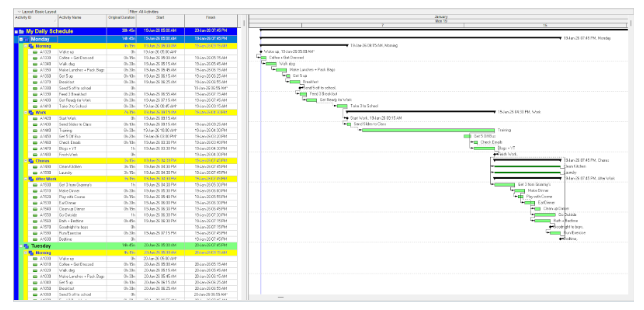
I know, this one sounds a little silly but if you’re new to scheduling and struggle with creating and planning project work, don’t. Instead, I tell my students to plan something more personal like your day, preparing Thanksgiving dinner, or redecorating a room in their home. These smaller scope “projects” give you a lot of practice in P6 – planning in greater detail (even down to the minute), changing user preferences around to meet your needs, adding more detail to calendars, and providing ample opportunities to record actuals throughout your day.
7. Take a P6 course!
Formal training is crucial to understanding the foundational concepts of using an application like P6. Global PM offers introductory courses in person and online. For more information about our training options, check out this blog: https://globalpm.com/virtual-vs-in-person-p6-training/
Want to hear more about learning Primavera P6? Check out this video with our senior trainer, Kari Jackson: