
2 Reasons You Should Avoid Using the Must Finish By Date in Primavera P6
Author: Global PM
Primavera P6 gives you several ways to guide project deadlines—but the Must Finish By constraint is one of the most misused. While it seems harmless, it often creates more confusion than clarity. Here are the two biggest reasons seasoned schedulers steer clear of it.
1. It Creates Misleading Positive Float and Distorts the Critical Path
The moment you apply a Must Finish By date, P6 begins generating float relative to that date, not the project logic. This means a schedule that’s actually finishing early may suddenly show positive float, making it look like tasks have room to slip when they really don’t. Even worse, the true critical path can appear to shift or even disappear entirely, because float is no longer based on logic-driven late dates.
Applying a Must Finish By date, sets the starting point for calculating the backward pass and every activity’s late date is recalculated to reflect the latest time it can start and finish before delaying passed the Must Finish By rather than the scheduled finish date. As a result, the total float value for every activity is also recalculated to reflect the amount of time the activity can be delayed before changing the Must Finish By date.
By default, P6 projects define critical activities using a total float value of less than or equal to 0h, so when the total float is targeting a Must Finish By date and becomes positive, you will lose visibility to your critical path. It is best practice to change your definition for critical activities to reflect the longest path, especially if you elect to use a Must Finish By date.
Why it Matters:
When the float no longer reflects real schedule logic, you lose accuracy in reporting, forecasting, and risk analysis. It becomes harder to explain the schedule, harder to defend it, and easier for stakeholders to misinterpret progress.
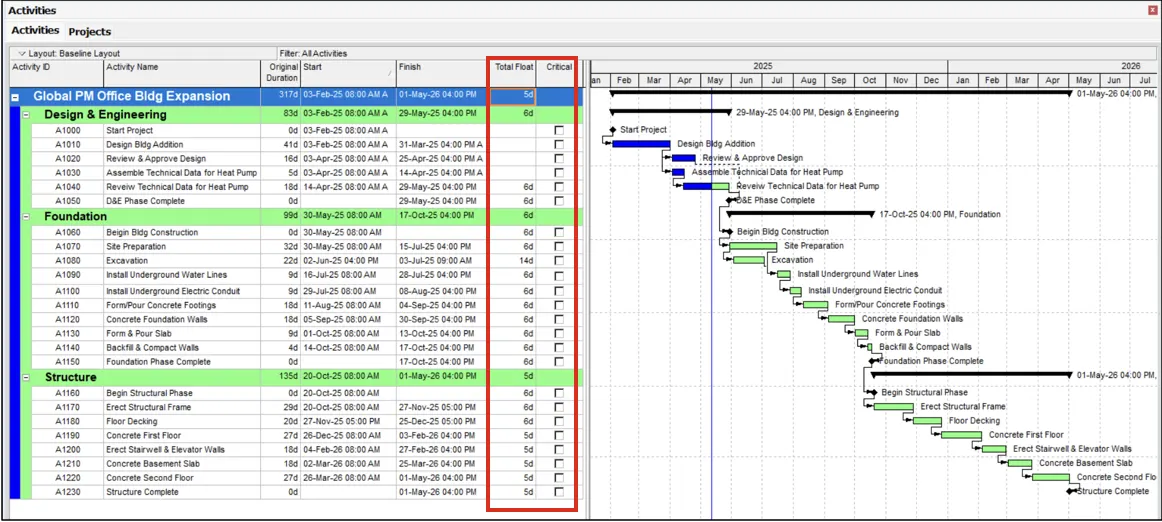
In the project below, the Must Finish By date is May 8, 2026, and the project is scheduled to be completed prior to that on May 1. This calculates the Total Float for every activity as greater than zero, because it reflects the amount of time work can slip before delaying the Must Finish By Date and the project is scheduled to finish before the targeted date. By default, P6’s schedule options will no longer show the critical path when the project is scheduled to complete prior to the targeted Must Finish By Date.
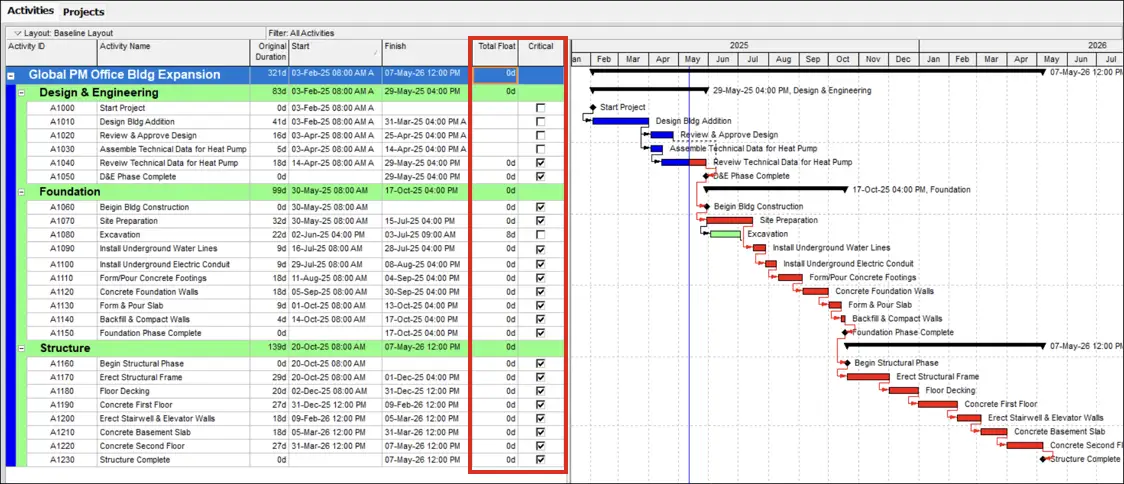
The same project with the Must Finish By removed displays the appropriate critical path.
2. Hidden Time-of-Day Rules Cause Unnecessary Negative Float
By default, P6 sets the Must Finish By as occurring at midnight, which leads to a classic, frustrating scenario: Your schedule finishes on the correct calendar date, but P6 still shows negative float because the activity finishes at, say, 5:00 PM—after the midnight time stamp P6 assumed.
This forces users into awkward workarounds, like:
- Selecting a Must Finish By date one day after the true completion date, or
- Switching schedule display to time to compensate for the hidden time-of-day component.
Both "solutions" introduce clutter or confusion, especially for stakeholders reviewing high-level reports.
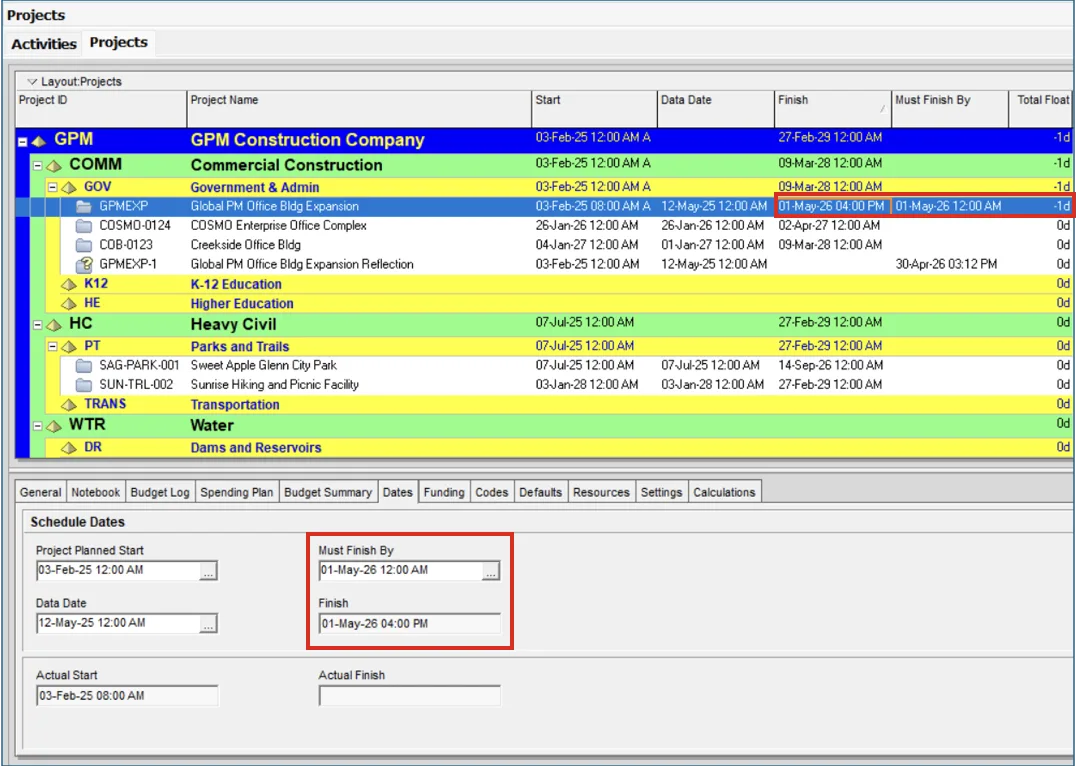
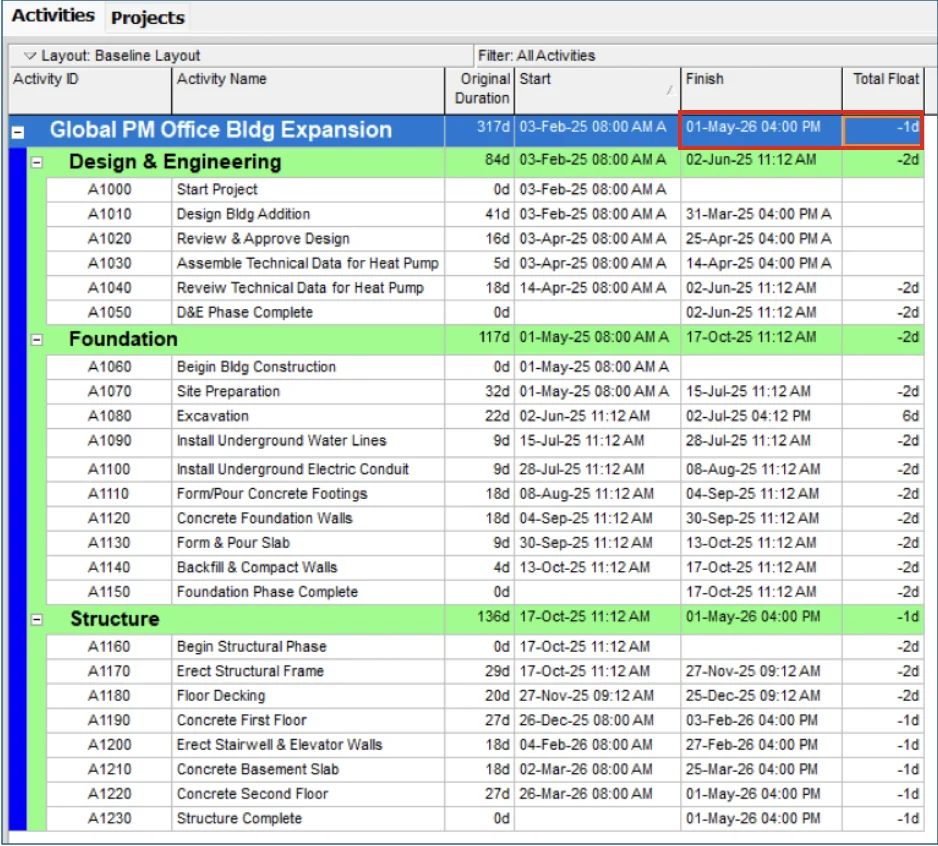
The project below shows the project is scheduled to finish on May 1, 2026, at 4pm, however, the Must Finish By is set to May 1, 2026 at 12AM, resulting in a calculated Total Float value of -1d for the project.
For more about the Must Finish By date, check out this video with our Senior Primavera Instructor, Kari Jackson.